Top 10 Tips for a Successful Horizon VDI

Top 10 Tips for a Successful Horizon VDI

Top 10 Tips for a Successful Horizon VDI

Here are my top ten tips and tricks for a smoother deployment of VMware Horizon® View™ Standard Edition. These suggestions are informed after spending several years as a Technical Support Engineer. This is not a complete list, so please refer to the official Horizon View Documentation when planning your deployment.


VMware Social Media Advocacy

Announcing the VMware Horizon 7 Enterprise…

Announcing the VMware Horizon 7 Enterprise Edition Multi-Site Reference Architecture Paper

Announcing the VMware Horizon 7 Enterprise…

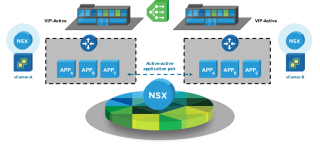
Organizations want to keep the business operating during an extended or catastrophic technology outage, providing continuity of service and allowing staff to carry out their day-to-day responsibilities. VMware Horizon 7 Enterprise Edition Multi-Site Reference Architecture provides best practices and architectural blueprints for building a deployment that addresses these issues.


VMware Social Media Advocacy

vSphere Client (HTML5) Fling v3.0 – OVF Deploy…

vSphere Client (HTML5) Fling v3.0 – OVF Deploy (6.5 only), New VM from Content Library, Create Roles

vSphere Client (HTML5) Fling v3.0 – OVF Deploy…

Today we’re happy to announce version 3.0 of the HTML5 based vSphere Client Fling. For a long while we’ve been running with 2.x, but now there’s a big enough change that warrants a new version. There are a few big things available now (3 new, one very recent) which are worth highlighting:


VMware Social Media Advocacy

New vCenter Server Appliance File-Based Backup…

New vCenter Server Appliance File-Based Backup / Restore Walkthroughs

New vCenter Server Appliance File-Based Backup…

The vCenter Server Appliance (VCSA) 6.5 is full of new and exclusive features. One of which is the native file-based backup and restore. I’m happy to announce two new guided walkthroughs on the VMware Feature Walkthrough site.


VMware Social Media Advocacy

Interested in beta testing VMware Cloud on AWS?…

Interested in beta testing VMware Cloud on AWS? Indicate your interest!

Interested in beta testing VMware Cloud on AWS?…

Currently in Technology Preview, VMware Cloud on AWS will provide enterprise class application performance, reliability, availability and security with the best-in-class VMware technologies, all optimized to run on AWS, the #1 public cloud provider.


VMware Social Media Advocacy

Interested in VMware Cloud on AWS? Learn more…

Interested in VMware Cloud on AWS? Learn more with these videos

Interested in VMware Cloud on AWS? Learn more…

This year at VMworld Barcelona we provided a technical preview of the VMware Cloud on AWS service. With this partnership, we’re bringing the most trusted private cloud and the most used public cloud together for a seamless and integrated software-defined data center experience. It allows customers to use VMware’s proven tools on AWS’ global footprint.


VMware Social Media Advocacy

Test-drive the full capabilities of vSphere 6.5…

Test-drive the full capabilities of vSphere 6.5 by running the new hands-on lab!

Test-drive the full capabilities of vSphere 6.5…

Explore new features of vSphere 6.5 including encrypted VMs, HTML5 Host Client and the vCenter Server appliance. – See more at: https://my.vmware.com/en/web/vmware/evalcenter?p=vsphere-17-hol#sthash.uLIjx4Wl.dpuf


VMware Social Media Advocacy

First Look at AWS Management Portal for vCenter…

First Look at AWS Management Portal for vCenter Part 1: Deployment – Niktip’s Blog

First Look at AWS Management Portal for vCenter…

Cloud has been a hot topic in IT for quite a while, for such valid reasons and benefits it brings as agility and economies of scale. More and more customers start to embark on the cloud journey, whether it’s DR to cloud, using cloud as a Tier 3 storage or even full production migrations for […]


VMware Social Media Advocacy

Getting Started with Datacenter CLI – VMware…

Getting Started with Datacenter CLI – VMware vSphere Blog

Getting Started with Datacenter CLI – VMware…

Datacenter Command-Line Interface (DCLI) is one of vSphere’s newest CLIs. DCLI works exclusively with the vSphere Automation API (REST API for vSphere) to provide both an interactive and scriptable mode to monitor and manage all features made available to the REST based API. With the vSphere 6.5 release, DCLI has picked up a ton of The post Getting Started with Datacenter CLI appeared first on VMware vSphere Blog .


VMware Social Media Advocacy